Vipps MobilePay payments
Available from Version: in development

|
Vipps MobilePay are one Nordic mobile wallet that was once two: Vipps, founded in Norway and MobilePay, which originated in Denmark.
Both launched with a mission to deliver a service that made sending money as easy as sending a text. |

|
Vipps MobilePay general properties
| Operating countries |
|
| Currency | EUR, DKK, NOK |
| Minimum transaction amount | NOK 100 øre, DKK 1 øre, EUR 1 cent |
| Maximum transaction amount | Depends on the bank |
| Refund |
|
| Chargeback | No |
| Integration category | Asynchronous |
How it works
The processing of payments for goods using Vipps MobilePay consists of one step, during which the capture or reservation of the payment takes place.
The following diagram illustrates the steps involved in making payment that are relevant to you as a merchant.
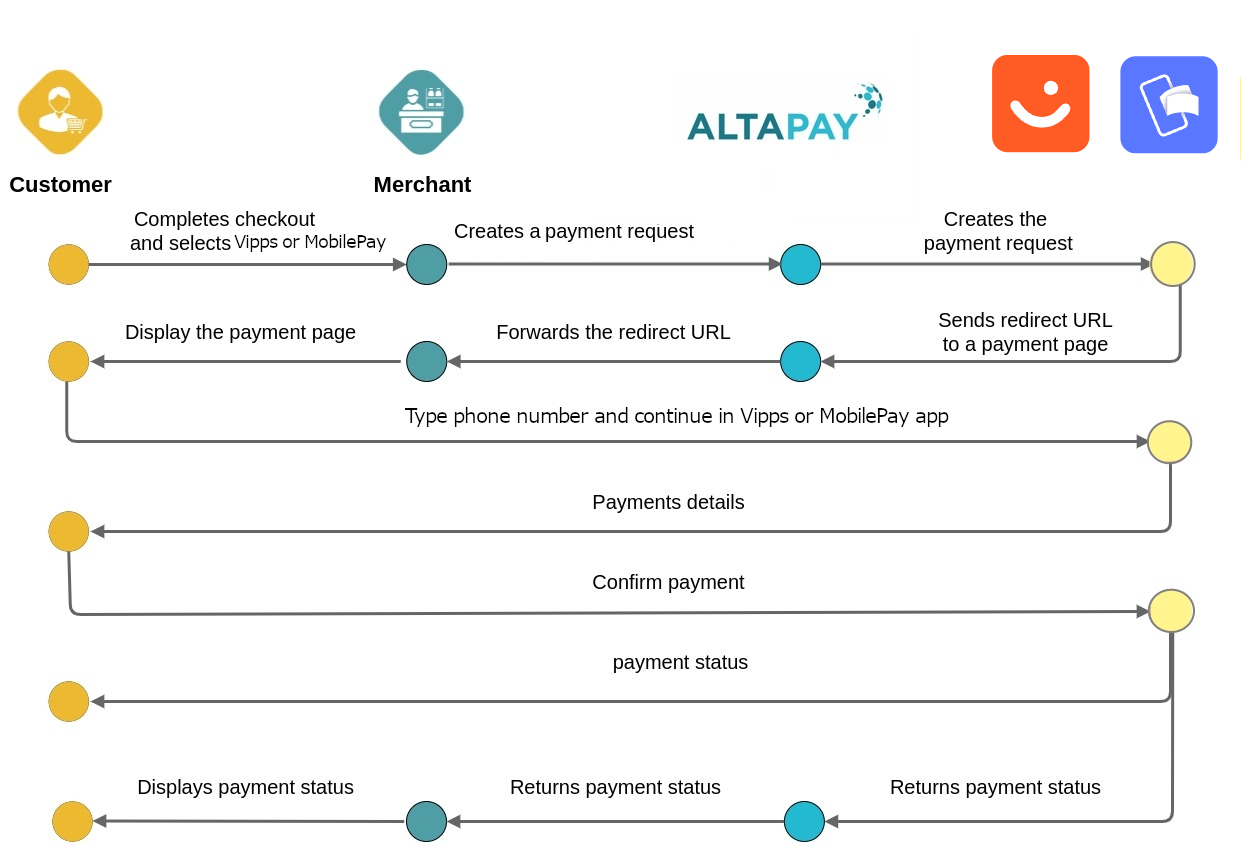
- The customer selects Vipps or MobilePay during checkout.
- The merchant creates a payment request through MarketPay Online.
- MarketPay Online forwards the payment request to Vipps or MobilePay.
- Vipps or MobilePay returns a redirect URL.
- The customer is redirected to the Vipps or MobilePay application.
- The customer reviews and confirms the payment.
- Vipps or MobilePay processes the payment.
- MarketPay Online receives the payment result.
- The merchant receives the payment status.
- The customer is redirected back to the merchant website.
Integration Scenarios
Checkout
Our Checkout API solution supports Vipps or MobilePay out of the box, meaning that it works as any other payment method. Whenever Vipps or MobilePay is enabled / configured it will be returned as a payment method.
Merchant API
To find out how to integrate with Vipps MobilePay directly to the Gateway using our merchant API, see Integrating using the Merchant API
- Pre-step: Setting up a server-to-server session. Create a session containing all information needed to process the payment (except for the payment instrument data). This call returns a session ID required in the next call. For more details on setting the checkout session, see checkoutSession.
- Transaction Execution: Provide the payment details in a second server-to-server call on the gateway endpoint to create payment request with createPaymentRequest method.
 Setting parameters in createPayment Request
See the mandatory and configurable parameters by selecting Vipps MobilePay in the drop down list on the Create Payment Request page
Processing a Capture
Capture take place after the reservation of funds. There are several capture scenarios.
- Full capture, where funds are taken for the entire transaction
- Partial capture, where funds are taken for some of the order lines
Processing a Refund
Refunds take place after the capture of funds. There are several refund scenarios.
- Full refund, which returns the funds for the entire transaction
- Partial refund, which returns the funds for some of the order lines
Setting parameters in refundCapturedReservation Request
See the mandatory and configurable parameters by selecting Vipps MobilePay in the drop down list on the Create Refund Request page
Test the integration
You can test the Vipps MobilePay integration with us by using the MarketPay Online Sandbox. In order to do this, please check ePayment test integration page.